1. Context
A booking platform built on WordPress and WooCommerce required a reliable way for guests to download a PDF version of their reservation directly from the “Order received†page.
The system needed to support two different payment-based outputs:
- Credit/Debit Card → single-page confirmation PDF
- Direct Bank Transfer (BACS) → two-page PDF including bank instructions and reservation summary
The PDFs had to match the exact Elementor design, not a simplified HTML layout.
2. Operational Constraints
- Dompdf could not reliably reproduce Elementor layouts
- Shared hosting environment prevented headless Chrome installation
- PDF output had to match Elementor templates exactly
- Dynamic order and listing data required secure rendering
- Template ID differences between staging and production environments
3. System Requirements
The system needed to:
- Generate pixel-accurate PDFs from Elementor templates
- Support payment-method-based template routing
- Maintain secure order-level access control
- Operate within shared hosting constraints
- Avoid heavy server dependencies
- Ensure stable deployment across environments
4. Architecture Overview
A custom WordPress plugin was developed to implement a raster-to-PDF rendering pipeline using a secure HTML endpoint, third-party rendering service, and server-side PDF assembly.
4.1 Secure Render Endpoint
- Created a protected URL that renders a specific Elementor template for a specific order:
/render-elementor-template/{order_id}/{template_id}/?key={order_key} - Prevented unauthorized access by validating the WooCommerce order key.
- Added a “zoom” mechanism to control legibility in the capture.
4.2 Dynamic Data Injection
Added custom shortcodes usable inside Elementor templates to output booking/order data, such as:
- Order number (custom format)
- Order date
- Total (with currency logic)
- Billing info (name/email/phone/address)
- Listing title
- Listing “friendly address” via
_friendly_address - Listing owner phone number
- Check-in / check-out dates
- Payment method label
- Reference / “poziv na broj”
4.3 High-Resolution Capture Layer
- Used ApiFlash to capture the Elementor-rendered page at a fixed A4 pixel size (300 DPI equivalent).
- Tuned settings for quality: format, device scale factor, viewport size, delay, cache control (“fresh”).
- Captured:
- BACS → template 1 + template 2 → two images
- Card → template 2 → one image
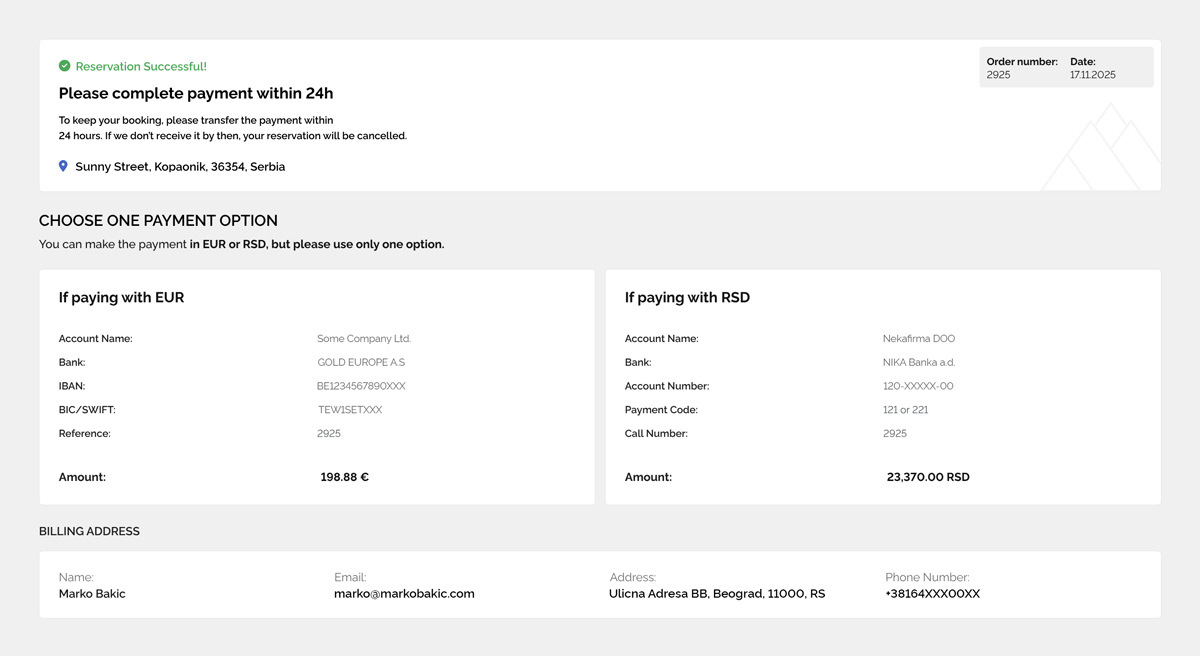
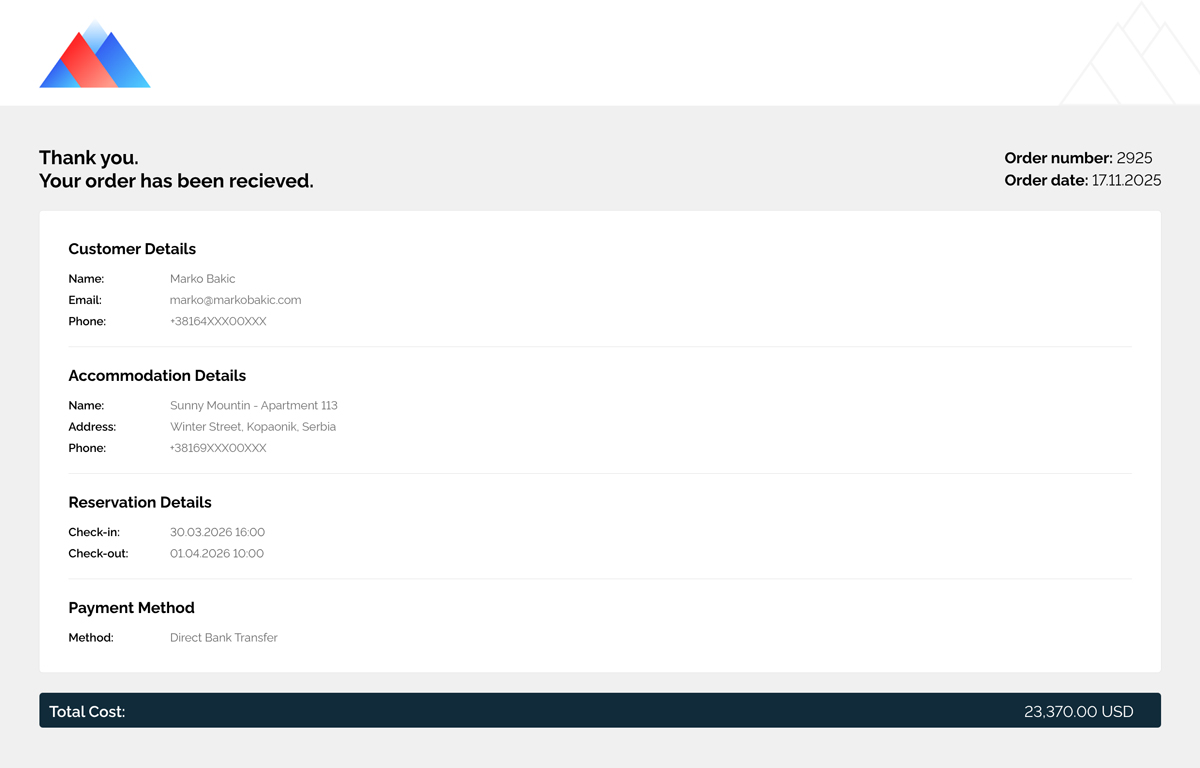
4.4 PDF Assembly Pipeline
- Used Imagick to place each captured image onto A4 pages and produce a multi-page PDF.
- Cached generated images/PDFs in
wp-content/uploads/pdt-cache/for performance.
4.5 Payment-Based Routing Logic
- Download link points to
/download-order-pdf/{order_id}and automatically chooses the correct template set based on payment method:- BACS → 2 pages
- Card → 1 page
5. What the client/user gets
- A Download as PDF link on the booking confirmation page that outputs:
- PDF output matching Elementor layout and branding
- Correct page count and no “extra blank pages”
- Correct dynamic content per order and listing
6. Technology Stack
- WordPress + WooCommerce
- Elementor (template source)
- Custom plugin (PDF Download Template)
- ApiFlash (HTML-to-image rendering)
- Imagick (PDF assembly)
- Custom shortcodes + secure endpoint
7. Outcome
- Pixel-accurate PDFs matching Elementor designs
- Compatible with shared hosting
- Stable multi-page output without blank pages
- Secure per-order rendering
- Reliable deployment across staging and production